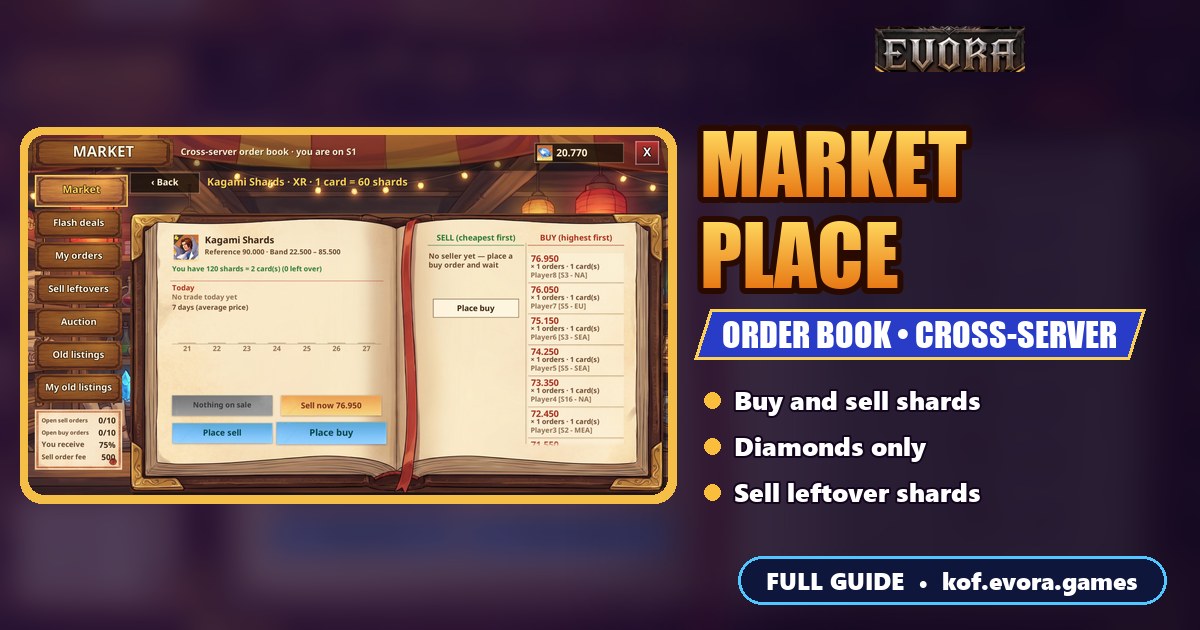
The Marketplace is one shared market for every server and region. It works as an order book: players post sell orders and buy orders for each item, and they match automatically. All prices are in Diamonds. It opens at Agent Lv. 15.
Tabs
- Market: the item list, by tab: Hero shards, Battle Soul, Chip, Mech and Items. Search by name; each row shows the lowest ask, the highest bid and today's trades.
- Flash deals: sell orders priced far under the reference price.
- My orders: your open orders and your trade history.
- Sell leftovers: sell spare shards to the game (see below).
- Old listings / My old listings: leftovers from the previous market version, which you can still buy or withdraw.
- Auction: the live Marketplace auction, held in the evening with a series of short lots (bid in Diamonds or use the buy-now price).
Units
Items trade in units. One unit of hero shards is a full card (20 shards for R, 30 for SR, 60 for SSR / LR / XR, 90 for SP). One unit of Battle Soul is a pack of 100 shards. Chips and Mech trade in sets; most other items trade one by one. The order form shows how many units you hold and how many shards are left over.
Order book
- Open an item to see its order book: the sell and buy columns grouped by price, today's trades and a 7-day chart.
- Buy Now buys at the lowest ask; Sell Now sells to the highest bid. Place sell / Place buy post an order at your own price.
- Prices must stay inside a band of 25% to 95% of the item's reference price, which the order book shows.
- Matching: best price first, then the earliest order. A trade happens at the price of the order that was there first. Orders can fill partly. You can never trade with your own orders.
- One order is 1 to 10 units. You can have up to 10 open sell orders and 10 open buy orders.
- Orders expire after 7 days; whatever is left comes back to you.
- Very cheap sell orders (under half the reference price) wait 5 minutes before they can trade; they are shown at once with a countdown in Flash deals, and the buy orders that were already waiting get them first.
- Many items also have standing buy orders a little under the usual price, so Sell Now usually finds a buyer.
Fees and payout
- Posting a sell order costs 500 Diamonds; changing its price costs 250 and puts it at the back of the queue.
- Posting a buy order is free, but its Diamonds are held until it fills, is cancelled or expires. Changing its price costs 250.
- Fees are not refunded (except a Sell Now that sold nothing).
- The seller receives a share of the price based on their level when the order was placed: 25% under Lv. 60, 50% at Lv. 60–89, 75% from Lv. 90. The rest is removed from the game.
Sell leftovers
Shards that do not make a full unit (for example 25 shards of an R fighter: 1 card plus 5 left over) can be sold straight to the game at 10% of the reference price. If a fighter is already at UR★5, all of their shards count as leftovers. There is a daily cap on how much the game buys back.
Delivery and safety
- Everything you receive (payment, items you bought, refunds, cancelled or expired orders) arrives by Mail, exactly once.
- Posting an order holds its items or Diamonds right away, so a trade can never fail halfway.
- Items you bought on the Marketplace cannot be sold again for 24 hours.
What can be traded
Hero shards, Battle Soul shards, chip and Mech shards, keys and certificates, recruit tickets, Fighting Spirit and Fighting Spirit Shards, and other bag items. Account-bound things cannot be traded: outfits and other cosmetics, Royal Banknotes, basic upgrade materials, currencies, event items, boxes, and shards of fighters not yet released.
Tips
- Compare the lowest ask with the reference price before using Buy Now.
- Not in a hurry? Place a buy order a little under the lowest ask and wait.
- Reach Lv. 60 and 90 before selling a lot: your payout share doubles and then triples.
Data as of 27/11/2026.